Pawjot won't open after updating to iOS 27? It's a known issue in 1.9.0, and the fix (1.9.1) is with Apple for review. In the meantime you can log from the web version; sign in with "Continue with Apple".
The iOS 27 launch problem is fixed. Update to 1.9.1 on the App Store.
The little things you notice today.
Pawjot
remembers
it.
Log it in thirty seconds, or record every detail your vet would want. If your pet lives
with a chronic condition or is getting older, glucose, fluids, seizures and body
condition have their own place too. Scattered moments become a clear record of what
changed and when.
Works offlineEnglish · 繁體中文 · 日本語 · 한국어Your records stay yours
9:41
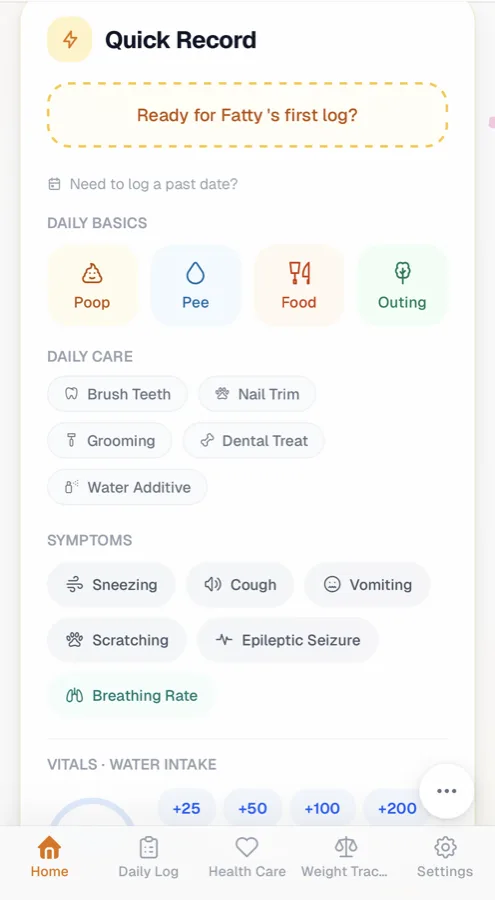
Quick Record
Ready for Mochi's log?
Daily basics
Poop
Pee
Food
Outing
Daily care
Brush TeethNail TrimGroomingDental Treat
Symptoms
SneezingCoughVomitingScratchingBreathing Rate
Vitals · water intake
+25+50+100+200
Home
Daily Log
Health Care
Weight
Settings
9:41
Mochi's Weight
7D30D90DAll
Current4.80
Change+0.38
Average4.61
Trending up · over 30 daysNotable gain — worth mentioning to your vet
Home
Daily Log
Health Care
Weight
Settings
9:41
Vet Visit Summary
Profile & Conditions
Recent Weight (30d)
Current Medications
Recent Symptoms
Questions for your vet
Scratching behind the left ear since Tuesday — allergy or just dry skin?
Export as PDFLive QR link
Home
Daily Log
Health Care
Weight
Settings
Appetite Good
Medication done
Weight 4.8 kg
Daily log complete
From people already logging
Messages we've had from Pawjot users
Since I started using Pawjot, looking after my pet has become so much easier. Even
first-time owners pick it up right away.
Chubby's family · Instagram
Thank you — of the 15 to 20-plus apps I’ve downloaded, yours is the best!
Pawjot user
The medical side is recorded in real detail. Ideal for prepping the questions you want
to ask the vet.
Pawjot user
Three kinds of pet parent, one app
Log as much as you like. Pawjot keeps up.
The same Food button can be a single tap, or a record of how many grams, whether the bowl was finished and which food it was. How far you go is up to you, your day, and how your pet is doing.
If you want it quick
Thirty seconds at a time, and the whole day adds up.
One tap to log: food, poop, pee and water, with the time filled in
Tick off meds: one tap per dose, stamped with who gave it
Streaks and Paw Points: for the days when you need a nudge
Log for everyone at once: several pets in one go, no switching between them
If you want every detail
Every entry can hold what your vet will ask about.
Poop: Bristol stool scale, with a photo
Pee: how much, and whether the colour looks off
Food: dry, wet or treats, how many grams, how much was left and which food
Water: logged in mL, with 7, 14 and 30-day daily averages
Vomiting: what came up and how often; breathing rate: breaths per minute
Symptoms: sneezing, scratching, hiding and more, each with its own time and note
Backfill: forgot yesterday? Fill that day in today
Health monitoring: weight against appetite, and how often symptoms come up
If your pet is chronically ill or getting older
After the diagnosis, every day comes with a plan.
Chronic condition modesPlus: diabetes, epilepsy and kidney disease each get their own log and dashboard See scenario four →
Chronic conditions: 16 conditions and IRIS stage, printed on the emergency card and the vet PDF
At-home checks: body condition, muscle, mobility, and whether the food gets eaten Read on →
Worth a look: a heads-up when appetite, weight, water, bathroom habits or energy change
Care templates: subcutaneous fluids, insulin and tube feeding, with site and dose
Vaccines and parasite control: pick a product and the next due date is worked out for you, with a reminder for any parasite type still uncovered
Vet visit prep: all of the above in one PDF to take into the exam room
A day with Pawjot
Thirty seconds here. Thirty seconds there.
By bedtime, the day is
on the record
Nothing here takes a sitting-down-with-a-notebook moment. You tap what you noticed, when
you noticed it — and the day assembles itself.
07:10
Breakfast, and she cleared the bowl
One tap on Food. Portion and time come along with it.
Food · 45 gAppetite · Good
08:00
Morning tablet, ticked off
The reminder fires, you tick it, and it's stamped with who gave it.
Medication · doneLogged by you
13:20
Litter box, worth noting
Bristol scale, colour, anything odd. Two taps while you're already there.
Poop · normalPee · normal
19:45
That third sneeze today
A symptom tap now is the thing you'll be glad to have in four weeks.
Sneezing ×3Photo attached
22:40
One last look before lights out
Anything you forgot, batch it in one save with Summarize the whole day.
Everything else was normal
Today
Mochi's day
A quick daily check-in.
Meals & appetite
Medication
Litter box
Symptoms
Everything else
Mochi's day is loggedDay 1 of many
Scenario one
Tap it in now. No reconstructing the day later.
Everything you'd want to remember about a day is one screen away: appetite, mood,
activity, both trips to the litter box, symptoms, photos, outings. No forms, no
categories to invent.
Tap, don't type. Poop, pee, food and outings are one tap each.
Species-aware. Bristol scale for stool, feline-specific tests, sensible weight limits.
Works offline. Log on the vet's floor with no signal; it syncs when you're back.
Forgot a day? Backdate it, or batch the whole day in one save.
the actual screen
Scenario two
Changes too gradual to notice become easy to see.
Half a kilo over three months doesn't look like anything from the sofa. On a curve it
is unmistakable. Pawjot keeps the curve for you and flags the moment it starts to
bend.
7 / 30 / 90-day and all-time weight trends, with current, change, average and range.
Symptom counts — sneezing and vomiting over the last 7 days, appetite trend, activity.
Chronic condition modes for diabetes, epilepsy and kidney disease, with their own daily logs.
up half a kilo since spring — ask about the food?
Mochi's Weight
Trend · last 30 days
7D30D90DAll
Current4.80 kg
Change+0.38 kg
Average4.61 kg
Range4.42–4.80
Vet Visit Summary
Mochi · Domestic shorthair · 4 y 2 m
30 days
Profile & Conditions
Recent Weight (30d) +0.38 kg
Current Medications 2 active
Full Vaccination History
Recent Symptoms sneezing ×7
Recent Medical History 6 months
Export as PDFLive QR link
Questions for your vet:
1. the sneezing — allergy?
2. is the weight gain ok?
Scenario three
Walk in already knowing what to say.
The appointment is fifteen minutes and half of it goes on "when did that start?"
Pawjot answers that before you sit down — dates, doses, weights and the questions you
wrote at 2am, in one sheet.
A PDF to print or email, or a live QR link the clinic can scan that always shows the current data.
Your questions travel with it. Write them down the moment you think of them; they print at the end.
An emergency card for the days you don't have time to prepare — allergies, blood type, active meds, one tap away.
Scenario four · Chronic condition modes Plus
After the diagnosis, the daily routine is laid out for you.
Turn a mode on and the Today page gains the buttons that condition needs, while the dashboard shows only the numbers it cares about. None of your existing records change.
Diabetes Today Mochi
Last glucose186mg/dL · 08:10
Insulin today1/2doses
Total calories142kcal
7-day glucose trendSteady
GlucoseInsulinMealSeizureFluids
Diabetes
Glucose and insulin, however many times a day
Blood glucose
mg/dL, tagged fasting, before or after a meal
Insulin
Dose, type (for example Lantus) and injection site
Meal
What they ate, and how many kcal
Dashboard
Last glucose, doses today, total calories, 7-day trend
Reminder
An insulin reminder can be set up when you turn the mode on
Epilepsy
How often seizures happen tells you more than any single one
Seizure log
Duration in minutes and seconds; mild, moderate or severe
Dashboard
Days since the last seizure, episodes this month, average duration
Trend
30-day seizure frequency
Reminder
Epilepsy treatment reminder
Kidney disease
Fluids, water and lab values, read side by side
Sub-Q fluids
How many mL, and where
Water intake
mL per day, with a daily average
Lab values
BUN/CREA whenever new results come in, shown as a trend
Stage
IRIS stage, recorded with the condition
Reminder
Subcutaneous fluids reminder
Chronic conditions: room for more than three
Diabetes
CKD (Chronic Kidney Disease)
Epilepsy / Seizure History
Cushing's Syndrome
FIV (Feline Immunodeficiency Virus)
Feline Asthma
DJD (Degenerative Joint Disease)
Osteoarthritis
Feline Herpesvirus
FIC (Feline Idiopathic Cystitis)
Cardiovascular Disease
Hyperthyroidism
Tumor
Chronic Stomatitis
Diabetes Insipidus
Myasthenia Gravis
+ Add your own
Conditions print on the emergency card and the first page of the vet PDF, the page you hand to a stranger at 3am.
Senior & chronic care · Checks you can do at home
Your pet can't tell you what's wrong, but your hands can notice first.
Don't compare with other pets, only with your own pet last month. Four tools, three to five minutes each; and when something suddenly looks wrong, there is a place to log that too. Everything goes into the vet summary PDF, so the vet sees the change at a glance.
Body condition score (BCS)
Feel the ribs, look at the waist, look at the belly. Three questions narrow the 1–9 range, and the final level is yours to choose.
Muscle check
Feel four places: along the spine, the shoulder blades, the skull and either side of the pelvis. In a heavier pet, not feeling bone doesn't mean no muscle has been lost. In older pets, this is the change that weight hides most easily.
Mobility check
Cats don't cry out in pain; they change their route. Six questions about jumping up, jumping down, stairs, running and chasing, each asking the same thing: is it the way they used to?
Does the food get eaten Plus · full history
More left in the bowl than before. Are they tired of this food, or eating less of everything? It is worked out from your feeding logs, so you can tell the two apart.
Episode diary
Your pet's back suddenly twitches, they bolt, they turn and bite at themselves. Tap to start the timer, stay safe first, film if you can, and write down what happened once it stops. You don't need to know what it is.
“Not seen” never becomes “No”. Every question has a “Not seen” answer, so the vet sees what you actually saw.
One question each evening. Turn on “Keep watching” and note how much of the day you could observe your pet. The calendar shows which days were watched and which weren't.
When to get veterinary care right away, in three levels based on a vet's advice, one tap away while you log.
The vet summary lists how many entries, how long each lasted, how your pet was afterwards, and how many were logged before and after a medication started. Plus saves video
Mochi: recordingStarted 21:13
01:12
It stopped
Skin on the back rippling in wavesYesNoNot seen
Tail lashing hardYesNoNot seen
OctoberObserved 7 days · 2 records
Most of the timeSome of the timeHardly at allNot reportedHas records
Worth a look
Eating less than usual, a little weight lost, drinking more or less, poop or bathroom habits that seem off, lower energy, hiding more. Pawjot reads the last few days of logs, gives you a heads-up and has the vet summary ready. It isn't a diagnosis. It's a prompt to ask whether this is worth mentioning to your vet.
The content and data definitions of these five tools were reviewed by a veterinarian. They are at-home observations, not a diagnosis; if something worries you, see your vet.
Everything else it does
Everything you need when a simple log becomes important.
Not every part of caring for an animal is a health chart. These are the pieces that make
the rest of it lighter.
Medication reminders Plus
Active meds with a daily checklist, snooze, and a history of every dose, including the
ones somebody else gave. Push reminders are Plus.
Prednisolone · 2.5 mg08:00
Renal support12:30
Prednisolone · 2.5 mg20:00
Care sharing Plus
Invite one family member per pet on Free, or up to five family members or sitters on
Plus. Everyone logs into the same day, live,
and every entry carries the name of whoever made it — so nobody double-doses.
You10
BY3
Mochi was cared for 13 times this week — thanks to every pair of hands
Medical records
Vet visits, lab results and documents, with follow-up reminders.
Emergency card
The things a stranger would need at 3am, on one screen you can hand over without
unlocking anything else.
Emergency
Allergies
Chicken
Blood type
A
Active meds
2
FIV / FeLV
Negative
A dashboard per pet
Switch between them without losing your place — each with its own summary, quick
actions and weight curve.
Pet cards & stickers
Build a card from your own photos with templates, seasonal themes and the app's
hand-painted stickers. Export as PNG, JPG or PDF.
Vaccines & parasite control
Recommended vaccines and their due dates are worked out from your pet's birthday. For parasite control, pick from common products (NexGard Spectra, Revolution, Bravecto, Frontline Plus, Heartgard Plus and more), log this dose, and the next due date appears on its own. Each product is labelled with what it covers, whether fleas, ticks, heartworm or intestinal worms, and you're reminded about any kind that isn't covered yet. Both print on the emergency card and the vet PDF.
Chronic condition modes Plus
Diabetes, epilepsy and kidney disease each get their own log and dashboard. See scenario four →
Paw Points & badges
Streaks and six caretaker tiers, for the days when consistency needs a nudge.
Food & supply pantry Plus
Package sizes, what's left, expiry dates and what it all costs.
Paw Pals
Small, private packs of caregivers whose pets are dealing with the same thing as
yours. Peer questions, postcards to collect, and only your pet's name and photo
shared.
Dental & daily care
Brushing, dental treats, water additives, nail trims and grooming, tracked week by week, with a nudge when brushing is overdue.
Home reports
On the day a sitter visits, the timeline, photos and summary become one report, kept for good in your care circle.
Memories
One-line jots, a photo timeline, “on this day”, days-together milestones, weekly recaps and a look back at how they've grown.
Push notifications
You'll hear when a dose is due, when the sitter arrives and when the home report comes in.
Real people, real pets
What people say once Pawjot becomes part of the routine.
Everything below is a message or post from someone actually using Pawjot. Nothing here
is a stock quote or a paid review.
“
Since I started using Pawjot, looking after my pet has become so much easier. The
interface is simple and the flow is intuitive — even first-time owners pick it up
right away.
I had a quick look and you have clearly put so much care into the design. Thank you
for turning your own cat into something that helps every other one.
大
大貓媽媽Message to the Pawjot team
Just downloaded it for the first time — it really is more direct and easier to pick up
than other apps like it.
西
西多士家長Message to the Pawjot team
The medical side is recorded in real detail. It looks ideal for tracking check-ups,
especially for prepping the questions you want to ask the vet.
P
Pawjot userMessage to the Pawjot team
Had a quick look — it’s amazing! I’m adding all my cats. I’d never found a record-keeping app I thought was good enough.
M
Multi-cat familyMessage to the Pawjot team
Thank you — of the 15 to 20-plus apps I’ve downloaded, yours is the best!
U
Pawjot userMessage to the Pawjot team
Your pet could be on this page.
If Pawjot has become part of how you look after them, tell us — a photo, their name,
and what you've been tracking. We'd love to put them here.
Billed through the App Store. Cancel anytime from your device's subscription settings.
FAQ
What you'll want to know before you begin.
Can't find what you're looking for? Write to us — we read every email.
Is Pawjot really free?
Yes. Core features — daily logs, weight, medications, medical records, emergency card, and vet PDFs — are free for up to 2 pets. Pawjot Plus unlocks unlimited pets, chronic condition modes, and breeder mode.
What do the chronic condition modes include?
Diabetes tracks blood glucose, insulin and meal calories; epilepsy tracks seizures and how often they happen; kidney disease tracks subcutaneous fluids, water intake and BUN/CREA. Your existing records stay as they are when you turn a mode on.
Is Pawjot good for senior pets?
Yes. The body condition, muscle and mobility checks were made for older pets; when something suddenly looks wrong, the Episode diary is there. Everything goes into the vet summary PDF.
My pet suddenly bolts and bites at themselves and we don't know what it is yet. Can I log that?
Yes. The Episode diary needs no diagnosis first: start the timer, and once it stops write down what you saw and what you didn't. Add the vet's diagnosis later; everything logged before it stays.
Can I log in a lot of detail?
Yes. Bristol stool type, pee amount and colour, grams per meal and how much was left, water in mL, breathing rate and what came up when they vomited can all be logged, and you can fill in past days too.
Can I use Pawjot on Android?
Yes. Open app.pawjot.app in Chrome, sign in, then choose “Install app” or “Add to Home screen” from the menu, and Pawjot opens full-screen like any other app. The web version has a few limits for now: it runs on the Free plan only (Plus can be purchased only in the iOS app, though if you already subscribe on iOS, just sign in and Plus comes with you), and it has no push notifications, no medication reminders, and no app-icon badge. In-app browsers such as LINE or Facebook can’t install it, so open the link in Chrome instead.
What pets does Pawjot support?
Pawjot is built for cats and dogs. Many features (weight validation, Bristol scale, feline-specific tests) are species-aware.
Does it work offline?
Yes. Logs you create offline are queued locally and sync automatically when you're back online.
How is my data protected?
Your data is stored in Supabase with row-level security — only you can read your pets' records. Sign-in uses Apple, Google, or a one-time email code.
Can I share with my vet or partner?
Yes. Generate a Vet Summary PDF for any date range, or share an emergency card from the dashboard. Household sharing keeps caretakers in sync.
How do I cancel my subscription?
Subscriptions are billed and managed by the App Store. Cancel from your device's subscription settings — your account stays on Pawjot Plus until the period ends.
Can I delete my account and data?
Yes. You can delete your account from Settings inside the app. Deletion removes all your pets, logs, photos, and account information.
Take 30 seconds tonight. Give future you a clearer answer.
Free for up to two pets, forever. Thirty seconds from now you'll have the first day of a
record you'll be glad exists.